
本指南涵盖如何配置由 Legion Hosting 托管的 Project Zomboid 服务器——包括通过 GPanel 设置服务器配置文件和沙盒变量。
编辑任何配置文件之前请先停止服务器。 Project Zomboid 在关闭时将配置写入磁盘。如果您在服务器运行时编辑文件,当服务器下次停止时您的更改将被覆盖。始终先在 GPanel 中停止服务器,进行更改,然后重新启动。
配置文件概述
Project Zomboid 将服务器配置存储在服务器 /.cache/server/ 目录中的两个文件中。两个文件都使用您的服务器名称作为文件名的一部分。
| 文件 | 用途 |
|---|---|
/.cache/server/servername.ini |
核心服务器设置——密码、玩家数量上限、端口、PvP、语音聊天等 |
/.cache/server/servername_SandboxVars.lua |
游戏和世界设置——僵尸数量、战利品丰富度、速度、重生率 |
我的服务器名称是什么? 服务器名称在 GPanel 的 Startup 标签页中设置。除非您更改过,否则默认为
servertest。如果不确定,请检查 GPanel Startup 标签页——它是 Server Name 字段中的值。
步骤 1 — 在 GPanel 中打开文件管理器
- 登录 GPanel。
- 从服务器列表中点击您的 Project Zomboid 服务器。
- 在 Console 标签页中,如果服务器正在运行,点击 Stop。等待状态变为 Offline 后再继续。
- 点击 Files 标签页打开文件管理器。
- 导航到
.cache/server/目录。如果.cache文件夹不可见(因为它以点开头),您可能需要点击 Show Hidden Files 或切换隐藏文件可见性。
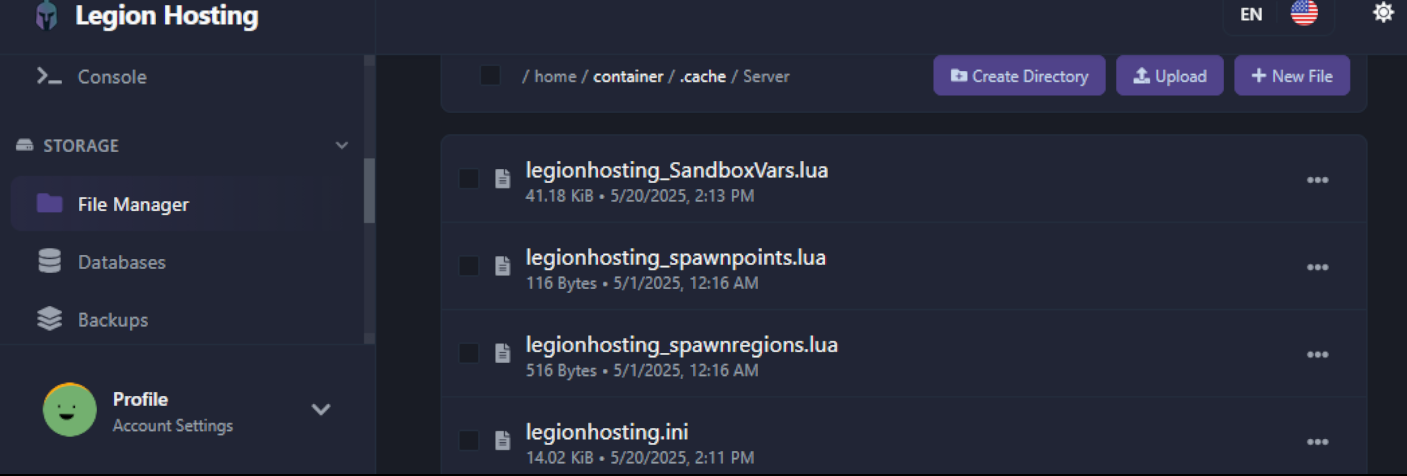
步骤 2 — 编辑服务器设置文件(.ini)
.ini 文件控制核心服务器配置。点击文件在内联编辑器中打开它。
常用更改设置
| 设置 | 描述 | 示例值 |
|---|---|---|
PublicName |
在公共服务器浏览器中显示的服务器名称 | My PZ Server |
PublicDescription |
在服务器浏览器中显示的简短描述 | Welcome! Friendly server. |
Password |
玩家加入时必须输入的密码。留空表示无密码。 | hunter2 |
MaxPlayers |
最大同时在线玩家数 | 16 |
PVP |
启用或禁用玩家对战 | true 或 false |
Public |
服务器是否显示在公共服务器列表中 | true 或 false |
DefaultPort |
服务器监听的 UDP 端口(默认 16261)。将此值与 GPanel 分配的端口匹配。 | 16261 |
Map |
地图名称。使用 Muldraugh, KY 作为默认地图。用分号分隔附加模组地图。 |
Muldraugh, KY |
Mods |
分号分隔的 Mod ID 列表。B41 格式:modid1;modid2。B42 格式:\modid1;\modid2; |
2392509783;2400857388 |
WorkshopItems |
分号分隔的 Workshop 物品 ID(必须与 Mods 列表匹配) |
2392509783;2400857388 |
Mods 和 WorkshopItems 必须保持同步。
Mods 下列出的每个 mod ID 必须在 WorkshopItems 下有对应的条目。不匹配是添加模组后服务器启动失败的常见原因。
完成更改后,在文件编辑器中点击 Save。如果您还想编辑沙盒变量,请先不要启动服务器——先完成步骤 3。
步骤 3 — 沙盒变量(游戏设置)
沙盒变量控制游戏体验:僵尸生成数量、移动速度、战利品稀有度,以及数十个其他世界参数。这些存储在同一 /.cache/server/ 目录中的 servername_SandboxVars.lua 文件中。
建议:使用游戏内管理面板而不是直接编辑此文件。 游戏内管理面板为每个沙盒选项提供带标签的滑块和下拉菜单,使查找和更改设置更加容易且不易出错。文件编辑是批量更改或服务器从未启动过时的替代方案。要访问它,请使用游戏内管理面板(以管理员身份在游戏中按 Esc)。
直接编辑 SandboxVars 文件
如果您更喜欢编辑文件,格式为 Lua 表。每个设置占一行:
SandboxVars = {
    Zombies = 3,          -- Population: 1=Insane, 2=Very High, 3=High, 4=Normal, 5=Low
    Distribution = 2,     -- Zombie distribution: 1=Urban focused, 2=Uniform
    ZombieSpeedType = 3,  -- Speed: 1=Sprinters, 2=Fast Shamblers, 3=Shamblers, 4=Crawlers
    LootAbundance = 3,    -- Loot: 1=Insane, 2=Abundant, 3=Normal, 4=Scarce, 5=Very Scarce
    DayLength = 2,        -- In-game day length in hours: 1=1h, 2=2h ... 15=15h, 16=Real Time
    StartYear = 1,        -- Starting year (offsets from 1993)
    StartMonth = 7,       -- Starting month (1–12)
    StartDay = 9,         -- Starting day (1–31)
    WaterShut = 0,        -- Tap water shutoff: 0=Never, 1=Instant ... 14=2 years
    ElecShut = 0,         -- Electricity shutoff: 0=Never, 1=Instant ... 14=2 years
    HoursForCorpseRemoval = 0,  -- 0=Never auto-remove
    CharacterFreePoints = 0,    -- Bonus starting trait points
}
沙盒设置仅适用于新世界。 如果您的服务器已经运行并创建了世界,在文件中更改沙盒变量不会追溯更改现有世界。要应用新的沙盒设置,您必须擦除世界并重新开始。如果您只想在游戏中途调整管理员可控的设置,请改用游戏内管理面板。
故障排除
我对 .ini 文件的更改未保存
- 最可能的原因是您保存文件时服务器仍在运行。Project Zomboid 在关闭时会覆盖配置。请先停止服务器,编辑文件,保存后再启动服务器。
- 确认您在 GPanel 编辑器中保存了文件后才离开页面——查看确认提示或检查文件的最后修改时间戳是否已更新。
在文件管理器中看不到 .cache 文件夹
- 隐藏目录(以点开头的目录)默认不显示。在 GPanel Files 标签页中查找 Show Hidden Files 切换按钮或复选框并启用它。
- 如果目录根本不存在,说明服务器尚未运行过。启动并停止服务器一次以生成配置文件,然后再编辑它们。
沙盒设置未在现有世界中生效
- 对
_SandboxVars.lua文件的更改仅在新世界中生效。对于正在运行的现有世界,请使用游戏内管理面板的选项标签页来调整设置,无需擦除世界。
需要更多帮助?提交支持工单,并附上您在 GPanel 中的服务器 ID 以及任何相关的控制台输出。